Win7系统LOL登录时遇到了一个预期之外的错误如何解决?
时间:2019-10-10来源:系统屋作者:lizhu
最近有Win7系统用户反映,登录LOL的时候出现提示“LOL登录时遇到了一个预期之外的错误”,导致LOL登入失败,用户反复试了几次,结果都一样,这让用户非常烦恼,那么,Win7系统LOL登录时遇到了一个预期之外的错误如何解决呢?下面,我们一起往下看看。

方法/步骤
1、找到我们本机内的hosts文件,如果Hosts在指向的时候出现了问题,是会出现LOL登入时遇到了一个预期之外的错误这种问题的;
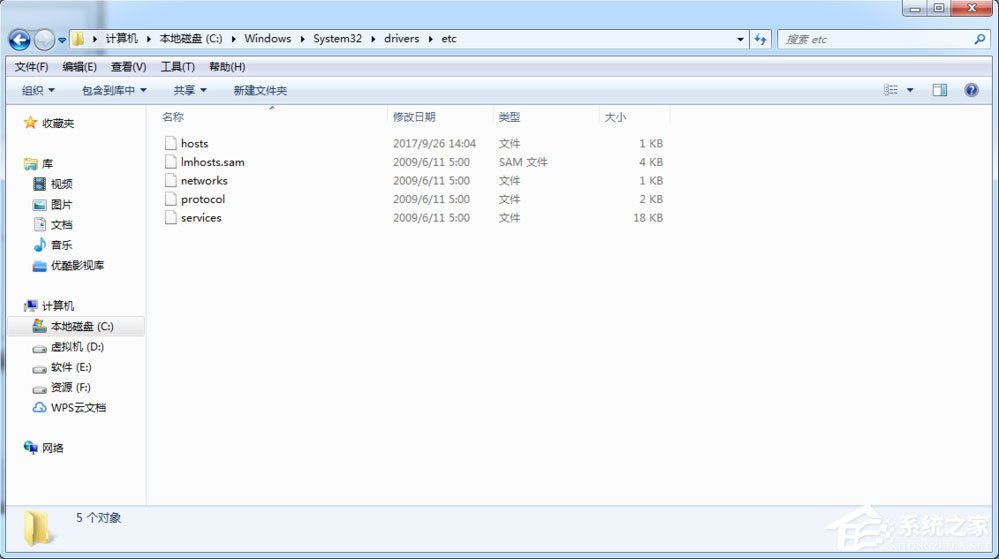
2、一般情况下路径为C:\Windows\System32\drivers\etc,找到这个文件然后清空文件内容,复制以下内容粘贴进去;
- 01# Copyright (c) 1993-2009 Microsoft Corp.
- 02#
- 03# This is a sample HOSTS file used by Microsoft TCP/IP for Windows.
- 04#
- 05# This file contains the mappings of IP addresses to host names. Each
- 06# entry should be kept on an inpidual line. The IP address should
- 07# be placed in the first column followed by the corresponding host name.
- 08# The IP address and the host name should be separated by at least one
- 09# space.
- 10#
- 11# Additionally, comments (such as these) may be inserted on inpidual
- 12# lines or following the machine name denoted by a '#' symbol.
- 13#
- 14# For example:
- 15#
- 16# 102.54.94.97 rhino.acme.com # source server
- 17# 38.25.63.10 x.acme.com # x client host
- 18# localhost name resolution is handled within DNS itself.
- 19# 127.0.0.1 localhost
- 20# ::1 localhost
# Copyright (c) 1993-2009 Microsoft Corp. # # This is a sample HOSTS file used by Microsoft TCP/IP for Windows. # # This file contains the mappings of IP addresses to host names. Each # entry should be kept on an inpidual line. The IP address should # be placed in the first column followed by the corresponding host name. # The IP address and the host name should be separated by at least one # space. # # Additionally, comments (such as these) may be inserted on inpidual # lines or following the machine name denoted by a '#' symbol. # # For example: # # 102.54.94.97 rhino.acme.com # source server # 38.25.63.10 x.acme.com # x client host # localhost name resolution is handled within DNS itself. # 127.0.0.1 localhost # ::1 localhost
相关信息
-
-
-
2019-12-13
Windows7强行删除文件的方法 -
2019-12-13
Win7系统关闭Windows错误报告的方法 -
2019-12-12
Win7系统找不到文件computer management.lnk怎么办
-
-
 Win7系统怎么清洗打印机?
打印机大部分每一家公司都有,它是缺一不可的,是办公家居中常用的一种办公设备,它给用户带来了很多便利,因此受到了很多公司的普遍使用,打印机工作一段时候后,很容易出现打印模糊的现象,这时候我们就需要清洗打印机,那么Win7系...
2019-12-12
-
 Win7系统libeay32.dll文件丢失的具体解决方法
Win7系统libeay32.dll文件丢失怎么办?当我们打开游戏程序时,有时候会遇到系统弹出提示框,提示丢失libeay32.dll文件,可以尝试重新安装解决此问题,出现这样问题有俩种情况,一是应用程序本身安装不完整,二是系统中的libeay32.d...
2019-12-12
系统教程栏目
栏目热门教程
- 164次 1 Win7有番号怎么下载电影?
- 163次 2 Win7系统资源管理器怎么打开?Win7系统资源管理器打开方法介绍
- 116次 3 Win7电脑任务栏怎么还原?Win7任务栏怎么还原到下面?
- 96次 4 Win7光驱读不出光盘的解决方法
- 80次 5 Win7电脑怎么设置挂机锁?屏幕保护伪装挂机锁的方法
- 77次 6 Win7打开设备管理器鼠标属性无"电源管理"如何处理
- 75次 7 Windows7怎么制作vbs病毒?
- 64次 8 Win7系统DNS服务器未响应的解决方法
- 60次 9 搜狗浏览器的收藏夹路径在哪?搜狗收藏夹如何导出到IE浏览器?
- 53次 10 Win7系统lol找不到launcher的解决方法
人气教程排行
- 1000014次 1 硬盘检测工具HDTune怎么用?
- 1000007次 2 PPTX格式文件怎么打开?
- 1000004次 3 表格数据整理很麻烦?Excel筛选数据超精准
- 1000003次 4 会声会影安装出现“setup.exe已停止工作”提示怎么解决?
- 1000003次 5 PS滤镜怎么安装?PS滤镜放在哪个文件夹中?
- 1000003次 6 ESET NOD32最新用户名和密码大汇总
- 1000002次 7 最新卡巴斯基永久激活码
- 1000001次 8 Excel表格中的宏是什么意思?Excel宏使用教程
- 1000000次 9 屏幕录制软件录制视频教程 屏幕录像专家怎样用?
- 1000000次 10 微信电脑版怎么登陆?电脑不扫描二维码登录微信的方法
站长推荐
- 164次 1 Win7有番号怎么下载电影?
- 122次 2 Adobe Photoshop CS6简体中文版的安装及破解方法
- 77次 3 互联网、万维网、因特网之间有什么区别?
- 72次 4 Mac使用迅雷离线下载的技巧
- 67次 5 电脑看视频一卡一卡的怎么办?网页看视频不流畅怎么处理?
- 67次 6 Win10 16257如何升级为最高端版本Win10 Pro for Workstations?
- 61次 7 电脑不能打字是什么情况?键盘无法输入文字怎么解决?
- 57次 8 linux系统查看硬件信息的方法
- 53次 9 苹果笔记本装Win7系统的方法
- 49次 10 如何关闭迅雷弹窗广告?怎么屏蔽迅雷弹窗广告?
热门系统下载
- 912次 1 CentOS 6.7 x86_64官方正式版系统(64位)
- 192次 2 CentOS 7.0 x86_64官方正式版系统(64位)
- 151次 3 Windows 10预览版9841官方64位/32位版
- 146次 4 深度技术 GHOST WIN7 SP1 X64 经典旗舰版 V2015.10(64位)
- 141次 5 GHOST WIN10 X86 装机专业版 V2017.04(32位)
- 131次 6 Windows 10 一周年更新1607官方正式版(64位/32位)
- 123次 7 华硕 AUSU GHOST WIN7 SP1 X64 稳定安全版 V2019.02 (64位)
- 108次 8 CentOS 6.2 x86_64官方正式版系统(64位)